

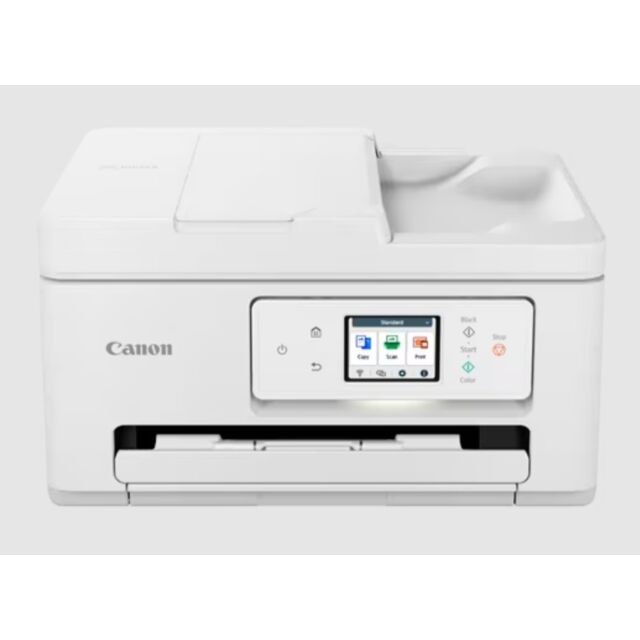


Canon TS7750I White A4 3 In 1 Wireless Inkjet Printer
Retail price
£119.00
In Stock
Colour
White
Manufacturer Guarantee
1 year
Canon TS7750I White A4 3 In 1 Wireless Inkjet Printer
TS7750i - Canon PIXMA
A fast, high-quality printer with streamlined usability and support for stress-free, money-saving printing via PIXMA Print Plan.
Overview
The smart, high-quality 3-in-1 with ADF and hassle-free ink subscription
This user-friendly, high-performance all-in-one printer slots effortlessly into any home. Supports PIXMA Print Plan, allowing savings of up to 50% on ink costs.1
Simple, intuitive UI
Enjoy effortless operation with the streamlined, customisable Switch UI2 system, which tailors functions to your needs: work, study or lifestyle
Fast printing
Get your documents quickly3 with fast print speeds of 15ipm (mono) and 10ipm (colour) and print a borderless 4x6” photo in just 19 seconds. Save time with auto 2-sided printing, a 2-way paper feed and 1 Push Copy
Wireless and smartphone connectivity
Enjoy cable-free printing via home Wi-Fi networks or Wireless Direct, and from mobile devices with Canon PRINT app, Mopria and Apple AirPrint
Creative software
Make great-looking posters, flyers, cards and more with free software like Easy PhotoPrint Editor, Creative Park and PosterArtist Web
Tilt Screen
The 2.7” colour touch screen is always easy to view and access, being located on a tilting panel on the printer’s front that can be set to vertical or a 45º angle.
PIXMA Print Plan
Save up to 50% on ink costs 1 . Choose a monthly subscription plan that suits your usage and have ink delivered to your home at no extra charge whenever supplies run low. And whether you’re printing documents or photos, one print is one page from your plan
Usability
The PIXMA TS7750i’s Switch UI2 keeps things simple: colour-coded menus show you only the icons you need for a specific task, be it work, study or creativity
Productivity
Save time with smart productivity features including 1 Push Copy, automatic two-sided printing and scan to smartphone
Superb photo prints at home
Print vibrant, high-quality photos at home thanks to FINE print head technology delivering rich gradation and reduced graininess
No wires required
Print wirelessly from a range of devices including smartphones and tablets with apps and services including Canon PRINT, Apple AirPrint and Mopria for Android
| General Specifications | ||
|---|---|---|
| Model Numbers | PIXMA TS7750i | |
| Functions | Wi-Fi, Print, Copy, Scan, Cloud | |
| - Printer Specifications | ||
| Print Resolution | Up to 1200 ¹ x 1200 dpi | |
| Print Technology | 2 FINE Cartridges (Black and Colour) | |
| Mono Print Speed | Approx. 15.0 ipm ² | |
| Colour Print Speed | Approx. 10.0 ipm ³ | |
| Photo Print Speed | Borderless 10x15cm : Approx. 19 seconds ⁴ | |
| Borderless Printing | A4, B5, LTR, 4" x 6", 5" x 7", 8" x 10", Card Size (91 mm x 55 mm), Square (89 mm x 89 mm), Square (127 mm x 127 mm) | |
| Two Sided Printing | Auto Duplex Print (A4, LTR - Plain Paper) | |
| Automatic Document Feeder (ADF) | Up to 35 Sheets (1-sided) | |
| - Cartridges and Yields | ||
| Standard Ink Cartridges | PG-585 (Black) | |
| CL-586 (Colour) | ||
| Optional XL Ink Cartridges | PG-585XL (Black) | |
| CL-586XL (Colour) | ||
| Cartridge Yield (Plain Paper) | A4 colour documents printing ⁵ | |
| Black: 180 pages | ||
| Black XL: 300 pages | ||
| Colour: 180 pages | ||
| Colour XL: 300 pages | ||
| Cartridge Yield (Photo) | 10x15cm photo ⁶ | |
| Colour: 65 pages | ||
| Colour XL: 109 pages | ||
| - Consumables and Yields | ||
| Maintenance Cartridge | MC-G06 (User Replaceable) | |
| - Paper Support | ||
| Paper Types | Plain Paper(64 g/m2 - 105 g/m2), | |
| Canon Red Label Superior(WOP111) | ||
| Canon Oce Office Colour Paper(SAT213) | ||
| Photo Paper Pro Platinum (PT-101), | ||
| Photo Paper Pro Luster (LU-101), | ||
| Photo Paper Plus Semi-gloss (SG-201), | ||
| Glossy Photo Paper "Everyday Use" (GP-501) | ||
| Matte Photo Paper (MP-101), | ||
| Photo Paper Plus Glossy II (PP-201) | ||
| Dark Fabric Iron on Transfers(DF-101), | ||
| Light Fabric Iron on Transfers(LF-101) | ||
| Maximum Paper Input | Rear Tray: Max. 20 sheets (photo paper) or Max. 100 sheets (plain paper) | |
| Front Cassette: Max. 100 sheets (plain paper) | ||
| ADF: A4, LTR = 35, LGL = 5, others = 1 | ||
| Paper Sizes | Rear Tray: A4, A4 Art paper, A5, B5, LTR, LTR Art paper, LGL, #10 Envelope, DL Envelope, | |
| Card Size (91 mm x 55 mm), 4" x 6", 5" x 7", 7" x 10", 8" x 10", | ||
| Square (89 mm x 89 mm, 127 mm x 127 mm), | ||
| Custom Size (width: 55 mm - 215.9 mm, length: 89 mm - 1200 mm) | ||
| Front Cassette: A5,A4,B5,LTR | ||
| Paper Weight | "Plain Paper: 64 g/m2 - 105 g/m2, or supported genuine Canon papers | |
| Canon paper: max paper weight : approx. 300 g/m2 | ||
| (Photo Paper Pro Platinum PT-101)" | ||
| - Scanner Specifications | ||
| Scanner Type | Flatbed, ADF and CIS colour scanner | |
| Scanner Resolution (Optical) | 1200 x 2400 dpi ⁷ | |
| Scanning Depth (Input / Output) | Colour: RGB each 16bit/8bit | |
| Greyscale: 16 bit / 8 bit | ||
| Maximum Document Size | Flatbed: A4, LTR (216x297mm) | |
| ADF: A4, LTR, LGL | ||
| - Copier Specifications | ||
| Copy Speed | sFCOT/Simplex: Approx. 18 sec. | |
| sESAT/Simplex: Approx. 7.0 ipm | ||
| ESAT/Simplex ADF: Approx. 7.0 ipm | ||
| Multiple Copy | 99 copies max. | |
| Copy Functions | Document Copying, Photo Copying, Borderless copy, 2-sided copy, 2-on-1 and 4-on-1 copy, Frame erase copy (Flatbed only), ID copy, Oversized copy, Tiling copy, Manual two-sided copy with ADF, Collated copy (ADF only) | |
| Copy Zoom | 25 - 400% | |
| Fit to page | ||
| - Interface | ||
| Display Type & Size | 2.7 inch/6.7cm LCD(Touch Screen, Color) | |
| Display Languages | 33 Languages Selectable: Japanese/English(mm & inch)/German/French/Italian/Spanish/Dutch/Portuguese/Norwegian/Swedish/Danish/Finnish/Russian/Czech/Hungarian/Polish/Slovene/Turkish/Greek/Simplified Chinese/Traditional | |
| Chinese/Korean/Indonesian/Slovakian/Estonian/Latvian/ | ||
| Lithuanian/Ukrainian/Romanian/ | ||
| Bulgarian/Thai/Croatian/Vietnamese | ||
| - Connectivity | ||
| Standard Interface | Hi-Speed USB (B Port) | |
| Wi-Fi: IEEE802.11 b/g/n ⁸ | ||
| Wi-Fi Security: WPA-PSK, WPA2-PSK, WEP | ||
| Wireless LAN Frequency Band: 2.4GHz/5GHz | ||
| Mobile Apps | Canon PRINT app ⁹ | |
| Easy-PhotoPrint Editor app ¹⁰ | ||
| Creative Park app ¹¹ | ||
| Printer Features | Easy-PhotoPrint Editor Software ¹² | |
| PIXMA Cloud Link ¹³ | ||
| Canon Print Service Plugin (Android) ¹⁴ | ||
| Apple AirPrint ¹⁵ | ||
| Wireless Direct ¹⁶ | ||
| Mopria (Android) ¹⁷ | ||
| PosterArtist Web | ||
| - Software | ||
| Supported Operating Systems | Windows 11, Windows 10、Windows 8.1、Windows 7 SP1 | |
| Operation can only be guaranteed on a PC with pre-installed Windows 7 or later. | ||
| macOS 10.15.7 ~macOS 13 | ||
| Supported Mobile Systems | iOS, iPadOS, Android, ChromeOS ¹⁸ | |
| Minimum System Requirements | Display: 1024 x 768 XGA | |
| - Physical Features | ||
| Weight | approx.7.3 kg | |
| Dimensions (W x D x H) | With the trays retracted approx. 374 x 350 x 208 mm | |
| With the trays extended: Approx. 374 x 605 x 283 mm | ||
| Acoustic Noise Levels | approx. 48.0(A) ¹⁹ | |
| Recommended Operating Environment | Temperature: 15-30°C | |
| Humidity: 10-80%RH (no dew condensation) | ||
| Power Source | AC 100-240V, 50/60Hz | |
| Power Consumption | Off: Approx. 0.1W | |
| Standby (connected to PC via USB): Approx. 0.9W (scanning lamp off) | ||
| Standby (all ports connected): Approx. 1.5W (scanning lamp is off) | ||
| Time to enter Standby mode: 10min | ||
| Copying: Approx. 22W ²⁰ | ||
| - Standard disclaimers | ||
| All specifications subject to change without notice. | ||
| Print speed may vary depending on system configuration, interface, software, document complexity, print mode, page coverage, type of paper used etc. | ||
| Ink yield may vary depending on texts/photos printed, applications software used, print mode and type of paper used. For yield information see www.canon-europe.com/ink/yield | ||
| Scan speed may vary depending on system configuration, interface, software, scan mode settings and document size etc. | ||
| All brand and product names are trademarks of their respective companies. | ||
| Microsoft, Windows and the Windows logo are trademarks, or registered trademarks of Microsoft Corporation in the United States and/or other countries. | ||
| ¹ | Ink droplets can be placed with a minimum pitch of 1/1200 inch | |
| ² | Document print speeds are the averages of ESAT in Office Category Test for the default simplex mode, ISO/IEC 24734. Photo print speed is based on the default setting using ISO/JIS-SCID N2 on Photo Paper Plus Glossy II and does not take into account data processing time on host computer. | |
| ³ | Document print speeds are the averages of ESAT in Office Category Test for the default simplex mode, ISO/IEC 24734. Photo print speed is based on the default setting using ISO/JIS-SCID N2 on Photo Paper Plus Glossy II and does not take into account data processing time on host computer. | |
| ⁴ | Document print speeds are the averages of ESAT in Office Category Test for the default simplex mode, ISO/IEC 24734. Photo print speed is based on the default setting using ISO/JIS-SCID N2 on Photo Paper Plus Glossy II and does not take into account data processing time on host computer. | |
| ⁵ | Declared yield value in accordance with ISO/IEC 24711 standard. Values obtained by continuous printing. | |
| ⁶ | Declared yield value in accordance with ISO/IEC 24711 standard. Values obtained by continuous printing. | |
| ⁷ | Optical resolution is a measure of maximum hardware sampling resolution, based on ISO 14473 standard. | |
| ⁸ | Wireless printing requires a working network with wireless 802.11b/g/n/a or ac capability, operating at 2.4GHz. Wireless performance may vary based on terrain and distance between the printer and wireless network clients. | |
| ⁹ | Requires an Internet connection and the Canon PRINT Inkjet/SELPHY app, available for free on the App Store and at Google Play. Compatible with iPad, iPhone 3GS or later, and iPod touch 3rd generation or later devices running iOS 7.0 or later, and Android mobile devices running Android 2.3.3 or later. Your device must be connected to the same working network with wireless 802.11 b/g/n/a capability as your printer. Requires a compatible social media account and is subject to that social media accounts Terms of Service. Certain exceptions may apply. | |
| ¹⁰ | The Easy-PhotoPrint Editor software requires an Internet connection and is compatible with the following operating systems; Microsoft Windows 10 (64-bit/32-bit), Microsoft Windows 8.1 (64-bit/32-bit), Microsoft Windows 7 SP1 (64-bit/32-bit), macOS High Sierra v10.13, macOS Sierra v10.12, Mac OS X El Capitan v10.11 and Mac OS X El Capitan v10.10.5. Minimum Windows and macOS/Mac OS X requirements are: 2GB of RAM and a monitor with 1024x768 resolution. The Easy-PhotoPrint Editor mobile application requires an Internet connection and the Easy-PhotoPrint Editor app v1.1.0, available for free on the App Store and at Google Play. Compatible with iPad Air2 (2nd Generation), iPad Mini 4 and iPhone 6s or later devices running iOS 10 or later, and Android mobile devices running Android 5.x or later. Certain exceptions may apply. The following file formats are supported: JPEG, PNG, HEIF (devices running iOS 11 and mac OS v10.13 or later), DLP save data, Poster Artist export data, EasyPhoto+ export data, Easy-PhotoPrint Editor export data. | |
| ¹¹ | Requires an Internet connection and the Creative Park app, available for free on the App Store and at Google Play. Compatible with iOS 12.0 or later/Android OS 5.0 or later operating systems. You must have a Canon ID and a Canon inkjet printer to use this app. | |
| ¹² | The Easy-PhotoPrint Editor software requires an Internet connection and is compatible with the following operating systems; Microsoft Windows 10 (64-bit/32-bit), Microsoft Windows 8.1 (64-bit/32-bit), Microsoft Windows 7 SP1 (64-bit/32-bit), macOS High Sierra v10.13, macOS Sierra v10.12, Mac OS X El Capitan v10.11 and Mac OS X El Capitan v10.10.5. Minimum Windows and macOS/Mac OS X requirements are: 2GB of RAM and a monitor with 1024x768 resolution. The Easy-PhotoPrint Editor mobile application requires an Internet connection and the Easy-PhotoPrint Editor app v1.1.0, available for free on the App Store and at Google Play. Compatible with iPad Air2 (2nd Generation), iPad Mini 4 and iPhone 6s or later devices running iOS 10 or later, and Android mobile devices running Android 5.x or later. Certain exceptions may apply. The following file formats are supported: JPEG, PNG, HEIF (devices running iOS 11 and mac OS v10.13 or later), DLP save data, Poster Artist export data, EasyPhoto+ export data, Easy-PhotoPrint Editor export data. | |
| ¹³ | The Easy-PhotoPrint Editor software requires an Internet connection and is compatible with the following operating systems; Microsoft Windows 10 (64-bit/32-bit), Microsoft Windows 8.1 (64-bit/32-bit), Microsoft Windows 7 SP1 (64-bit/32-bit), macOS High Sierra v10.13, macOS Sierra v10.12, Mac OS X El Capitan v10.11 and Mac OS X El Capitan v10.10.5. Minimum Windows and macOS/Mac OS X requirements are: 2GB of RAM and a monitor with 1024x768 resolution. The Easy-PhotoPrint Editor mobile application requires an Internet connection and the Easy-PhotoPrint Editor app v1.1.0, available for free on the App Store and at Google Play. Compatible with iPad Air2 (2nd Generation), iPad Mini 4 and iPhone 6s or later devices running iOS 10 or later, and Android mobile devices running Android 5.x or later. Certain exceptions may apply. The following file formats are supported: JPEG, PNG, HEIF (devices running iOS 11 and mac OS v10.13 or later), DLP save data, Poster Artist export data, EasyPhoto+ export data, Easy-PhotoPrint Editor export data. | |
| ¹⁴ | Canon Print Service is a print plug-in for Android smart devices, which enables printing from Android v4.4 - v5.0 devices to many Canon printers via a Wi-Fi network. The plug-in does not work as a standalone app. Available for free at Google Play. | |
| ¹⁵ | AirPrint functionality requires a compatible iPad, iPhone, or iPod Touch device running iOS 7.0 or later, and an AirPrint-enabled printer connected to the same network as your iOS device. A printer connected to the USB port of your Mac, PC, AirPort Base station, or Time Capsule is not supported. | |
| ¹⁶ | Requires a smart device with the Canon PRINT Inkjet/SELPHY app installed and connected to the desired active wireless network to complete cableless setup. | |
| ¹⁷ | Requires Android mobile device with Android 4.4 operating system or later with the Mopria Print Service pre-loaded with that device and the compatible PIXMA printer on the same wireless network. The Mopria experience is also available on Android 4.4 mobile devices with a download of the Mopria Print Service from Google Play. | |
| ¹⁸ | Some functions may not be available with these Operating Systems. Please refer to the manual or website for details. | |
| ¹⁹ | Acoustic Noise is measured based on ISO7779 standard(colour printing) with default setting. | |
| ²⁰ | When copying ISO/JIS-SCID N2 (printed by inkjet printer) on A4 size plain paper using default settings. |
| Manufacturer | Canon |
|---|---|
| Colour | White |
| Model Number | TS7750I |
Write Your Own Review
